Lesson 3 · 8 min
Distance and Distortion
Why shooting too close makes faces look wide and noses big, and the 4 to 6 foot distance that flatters almost everyone.
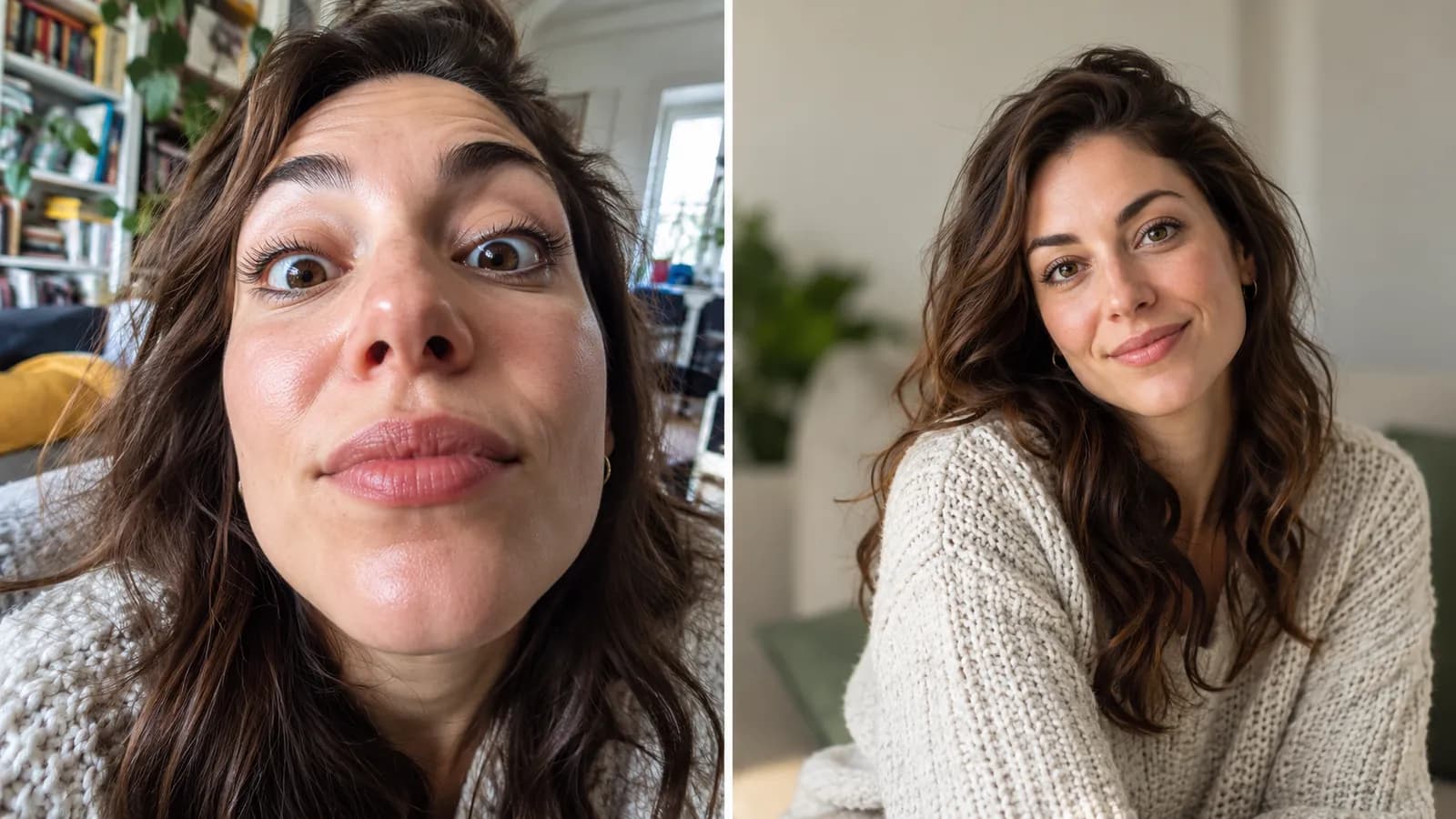
In this lesson: how the distance between you and your client changes the shape of their face in the photo. Why it matters on an HNC shoot: a client who sees a wide face and a large nose in their photos will not blame the lens. They will blame the photographer. Standing at the right distance costs nothing and fixes it.
The simple rule behind distortion
A camera makes things that are closer look bigger. How much bigger depends on how far away you are compared with how deep the thing is. That is all distortion is.
A face has depth. The tip of the nose sticks out about half a foot (6 inches) in front of the ears. Now look at the camera's view:
| Camera distance | Nose is | Ears are | The nose looks |
|---|---|---|---|
| 1.5 feet (selfie distance) | 1.5 ft away | 2.0 ft away | 33% bigger than the ears |
| 3 feet | 3.0 ft away | 3.5 ft away | about 17% bigger |
| 5 feet | 5.0 ft away | 5.5 ft away | about 10% bigger |
(Apparent size is in proportion to one divided by distance, so 2.0 divided by 1.5 gives 1.33, and 5.5 divided by 5.0 gives 1.1.)
At arm's length the nose is a third bigger than the rest of the face, so the middle of the face swells and the sides of the head fall away: the wide face, big nose look. At 5 feet the difference is small enough that the face looks like the person actually looks in real life. This is why the front camera held at arm's length is the least flattering way to photograph anyone.
The distance for portraits is 4 to 6 feet. Fill the frame by using your phone's 2x or portrait lens if it has one, or by cropping slightly afterward. Do not walk closer to fill the frame.
Groups: keep everyone at the same distance
The same rule decides how people look next to each other. Look at the diagram from above. When two people are both 3 feet from the camera, they appear the same size. When one is 2 feet away and the other 4 feet away, the near person looks twice as big, because 4 divided by 2 is 2.
So when you arrange a couple or a family, ask them to stand shoulder to shoulder in a line that is parallel to you, as if on a shelf. Then step back and take the photo from the middle of the line. If someone must stand in front, make sure the difference in distance is small, and put the smallest person at the front rather than the back.
Lenses and the edges of the picture
- Never use the ultra-wide lens (0.5x) for faces. It stretches anything near the edges of the frame and makes the problem you just learned much worse.
- Use the main camera (1x) or the 2x/portrait lens for people.
- Keep faces away from the very edge of the frame. Even on the main lens, the edges stretch a little.
- Tilting the phone makes lines lean. Keep the phone upright (not tilted up or down) when you photograph a building behind your client, or the building will lean in the picture.
How to check it quickly
- Stand 4 to 6 feet away. That is roughly two big steps back from arm's length.
- Look at the face on your screen. Do the cheeks look natural and the nose a normal size?
- If it does not, step back one more step and use the 2x lens or zoom in a little.
- Check the corners. If a person near the edge looks stretched, move them toward the center.
Common mistakes and how to avoid them
- Getting close "to be personal". Closeness comes from the framing and the moment, not from the lens being near the nose.
- Using the selfie camera at arm's length for client portraits. Use the main camera, and ask someone else (or the timer) for a shot with the client in it.
- Using the ultra-wide lens indoors because the room is small. Step into a doorway or a corner, or shoot a detail instead. Do not stretch a face.
- Putting people at different distances. Line them up an equal distance from the camera.
- Walking in to fill the frame. Zoom instead, or crop later.
Key takeaway
Stand 4 to 6 feet from your client, keep everyone the same distance from the camera, and let the zoom do the closing in.
Want to save your progress? Sign up as a photographer.